Something Familiar – Now Available as an eBook

My novella Something Familiar is now now available as an eBook through Lulu.

It will be available in paperback and from Amazon, Barnes and Noble, Apple iBookstore, and Kobo in the next few weeks.

If you want a sample to see if you’ll like it, the first chapter is currently up at Curious Fictions.

Something Familiar book cover.

Speed Writing #10 – Fumbled Shot

Stupid forest.  Stupid right of passage requirements.  Stupid bow and arrow.

So I’m not your typical elf.  Yes, I’m tall and can pretend to be a willow tree if I really try.  And it’s dark.  And you’re half blind.  I can stomp through the woods without making the kind of noise that draws attention, even if I want to call attention to myself.  I’m pretty smart, though I don’t think I’m really old enough to be considered wise.  I mean, who’s wise at nineteen?

My people have a rich culture mired in our history, and no one clings to tradition and history like elves.  I mean, I have some cousins, on my dad’s side, who still work for Saint Nicholas, despite the fact that their great, great, great, great grandparents fulfilled the terms of that indenture contract.  This might sound great, if you’re the sort of person who prefers stability to uncertainty, and custom to progress.

Continue reading Speed Writing #10 – Fumbled Shot

The Creepy Side of Writer Brain

Me: Arrrgh.  I’m paralyzed by nausea.

Brain: This does suck.

Me (later in the day): As if the nausea isn’t bad enough, now my whole body aches (seriously, my toe joints hurt). 

Brain:  Yep.  I feel your pain, quite literally.

Me: This is so miserable.

Brain: It is, but you know, there are two positives that come out of this.

Me: You can find positives in this?  What the hell?

Brain: You meditated a lot today.  And you have recent direct experience to inflict upon your characters.

Me: You’re kinda evil, you know that?

Brain: Can’t talk.  Plotting.  I’ll get back to you with some characters and a story arc post-haste.  Try to get some sleep.  I’m going to need you at peak condition.

Me: Yeah, cause that’s gonna happen. 


Check out all the Writer Brain shenanigans in reverse chronological order here.

Writing With the Dragon: A Voice Recognition Primer

So you’re a writer, and you’ve heard about voice recognition software. Perhaps you’re considering using it, because it sounds like a pretty nifty invention. Then again, you may have maimed yourself along the way and need alternative ways to get your stories out of your head and onto paper.

Most people who get as far as trying out voice recognition software are either curious or desperate. If you’re curious, you can probably skip ahead to the next paragraph. If you’re in the desperate category, as I once was, I can already hear the arguments forming. “Voice recognition? No way! I think with my fingers, not with my mouth.” Many writers get apoplectic when you even suggest the smallest modification to their routine. Hogwash, I say. The human species is incredibly adaptable, and the muse will not leave you simply because you have changed your ways. It’s plain stupid, not brave, to put up with and add to your pain when there are options. Trust me on this, I’ve been plenty stupid and wasted a lot of time not being able to write, which turns me into an unhappy, nasty, insomniac.

There are a lot of things to keep in mind when considering voice recognition software. I use Dragon NaturallySpeaking, but most of these tips are applicable to any recognition program.

Modify your expectations – it won’t be perfect, especially not right away.

Many people expect voice recognition software to be absolutely perfect from the get go and are then quite disappointed by the results. You will have to spend some time training the program to recognize your voice before you can even start to use the software. Initial training isn’t difficult or time consuming; these days it can be completed in as little as five to ten minutes. Since no two people pronounce everything exactly the same, the program has to tailor itself to the individual voice, so each user has their own profile. A good program will continue to learn and adapt after the initial training as the voice profile is used and corrections are made. I don’t expect my current software to recognize me with 100% accuracy. Maybe some of the upgrades down the way will, but until then, I expect to make corrections during my dictation, and with practice there have been fewer. Despite the need for occasional corrections, it is still faster than I used to type on a good day. Again, don’t expect to be fast right away. Remember, learning curve.

Train yourself, not just the software

Historically, speech has not been my preferred option for communication.  In using Dragon, I’ve had to train myself to speak properly. I’ve learned to enunciate, at least when I’m dictating. I’ve also learned to speak stories in complete sentences. This may sound frighteningly basic, but for those of us who are biologically wired to create via the written word, speaking a story is a new and clumsy process. Story tellers and story writers are not the same thing.

The first story I wrote with Dragon was an exercise in academic torture. Each sentence and phrase came out about three words at a time with great long pauses in between as I tried to figure out what I was doing. I’ve never had to think so hard when writing before, or since. Dragon NaturallySpeaking is designed to recognize natural speech, so you don’t need to talk slower than usual. The software uses context for selecting the proper homonym. It also uses context to attempt to catch misrecognition so you don’t have to make as many corrections. My slow and stilted style from the first few months gave the Dragon quite a challenge.

While you may not have the ideal set up, get as close to ideal as possible.

If your system comes out on the low end during the initial sound test, double check the microphone. How far is it from your mouth? Adjust it, and try again. Placement can make a significant difference. Are you talking into the right side of the microphone? Mine was rotated about 45 degrees off for the first six months or so, and since it recognized my speech with reasonable accuracy I didn’t check it for a long time. The recognition improved a lot with proper orientation. Also make sure you’re plugged into the right jacks on the computer. Most newer computers don’t give you a lot of options in this department, and sockets and plugs tend to be nicely color coded.

I’m using Dragon NaturallySpeaking Preferred version 10. Processor speed and memory are the two most significant factors and hard drive space is less of an issue these days, although voice files can get pretty big. I also started out with the freebie microphone that came with the software, but upgraded to an Andrea USB microphone with built in sound card. The advantage is that its sound card is designed solely for speech, while a regular sound card has to try to manage everything from video games to symphonies, resulting in lower quality speech processing.

I use Dragon in LibreOffice Writer, though it’s not fully compatible. I can run basic commands, but can’t control the entire word processor by voice. If I wanted to use Microsoft Word (which I really, really don’t), it would allegedly be fully compatible.  I’ll also use the built in Dragon Pad and copy/paste everything over to Writer when I’m done with the session.

Know when to save. 

Every time I close Dragon, it asks if I want to save the changes to my voice files. If I say no, any corrections I made to misrecognized words or new words and names that I taught it during the session will not be added to the voice profile. Generally you want to save your voice files as often as possible. I also keep an offsite backup since I’ve trained the software to recognize a number of unusual, foreign, and science fiction specific words. If I have a sore throat, stuffy nose, or a cold, I don’t save my voice files. I’ve not gotten around to creating a profile for my sick/asthma writing days, but this is a good option, particularly when you have an ailment that tends to linger or come up routinely.

Don’t give up. 

I would never say that it is easy to learn to use this software, and I constantly challenge people who claim it is. But it’s not impossible. People who naturally think in a spoken form will have an easier time of it. Expect to correct errors (and remember that it’s not always the fault of the program). Rewiring your brain takes time, but it’s good for you.

Tips for Starting Out

  • To prevent voice strain, always have something to drink on hand, and actually drink it. I use a straw so I don’t have to keep adjusting the microphone. Don’t try to speak unusually loudly or quietly, and take breaks.
  • When first starting out, do it when no one else is home. You’ll feel less like someone is reading over your shoulder.
  • Limit external noises such as music or fans. I’ve found that Dragon gets annoyed when my dogs bark.
  • Don’t dictate right after eating, especially if you have had chocolate or dairy products which can coat the vocal cords. Gargling with salt water or drinking grapefruit juice sometimes helps.
  • Let yourself be amused. If Dragon makes a mistake, laugh. It’s not the end of the world.
  • Do not bite your microphone when you get mad at misrecognition; it hurts.

Other notes:


Dragon NaturallySpeaking recognizes two forms of speech. Natural speech for when you are dictating, and command speech for your instructions to the program. Commands work best when issued separate from dictation. You will develop a command tone of voice.

Some of my favorite Dragon commands include:

  • “What can I say?” To provide a listing of verbal commands
  • “Correct that” To bring up a correction box for the the last chunk of text dictated
  • “Scratch that” To remove the last chunk of text dictated from the document
  • “Go to sleep” To turn off your microphone until you use the “wake-up” command
  • “Click file save” Which will give you the file drop-down menu followed by a virtual click on save.

Some of my favorite Dragonisms (errors in recognition) are posted on this page (cause this one was getting too long). It’s good for a laugh.

Speed Writing #9 – Inappropriate Apparel

The air was more than crisp as I stood at the bus stop, embracing the predawn stillness.  I’d had to haul out my hat and gloves this morning, and I could smell a hint of snow with each inhalation.  I tipped my head back and yawned, admiring the deep blue of the sky, where only the brightest stars and Venus could be seen. It was so quiet that everyday noises came across as intrusive.  The crunch of gravel and scrape of rubber soles against concrete warned me that someone was coming up the sidewalk behind me.

I glanced at him… well, it started as a glance but turned into straight out gawking.  The young man had sandy brown hair that would’ve fit right in with the skateboarders back when I was in high school.  He looked about twenty-four, roughly my age, and he hadn’t dressed anywhere close to appropriate for the temperature.  His short shorts and T-shirt showed off his very fine limbs;  He was obviously an athlete, but didn’t have weirdly bulky muscles.  He was several inches shorter than me, and had his head down, eyes pointed at his trainers, so I don’t think he noticed my lapse in manners.

Continue reading Speed Writing #9 – Inappropriate Apparel

The Good Doctor

Dean let out a sigh as he settled himself in front of the old IBM Selectric. Completing death certificates could be tedious, yet there was something rewarding about getting every last detail correct. There were so many places to get hung up, but decades of small-town medical practice had refined his skills. He’d been working on this one for days, although he’d been anticipating it for some time. Some things were inevitable.

The state of Minnesota had moved to electronic death reporting, and many of the fields he’d been able to leave blank in his early days of practice were now required. The Office of Vital Statistics had streamlined and standardized the documentation of death, but the process wasn’t any easier. As county coroner, Dean had done enough of them, and no one was as familiar with the finer nuances as he. Things would not be the same with him leaving. So few physicians understood the importance of accuracy, and that included his well-intentioned successor. Proper death reporting was an under-appreciated art.

Continue reading The Good Doctor

Science and Space Resources

Updated on September 17, 2025

Here are some great resources for some of the science-based quandaries and set ups that occur when writing fiction.  Medicine will have it’s own section.  Construction of worlds will be included with world building (because I love puns).

Continue reading Science and Space Resources

Me and My Sci-Fi Chair

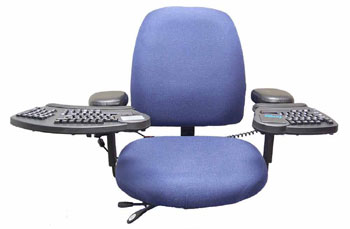
My office looks like the command center of a space ship. A low budget space ship with a clutter problem, perhaps, but futuristic nonetheless. Many years ago I banished my cheap ergonomic keyboard and kitchen chair and replaced them with a keyboard system.

I literally waited for this keyboard for years. I tested out a prototype in physical therapy in 1995 (not a typo, I’m that old), and after a few moments of typing I knew that I had found my soul mate. Ok. So it doesn’t exactly have a soul, but it’s definitely one of the first things I’d grab in an emergency of the house destruction kind. Unfortunately, as a newly developed device, it was also in a price range that made it unobtainable to a recent college grad and new homeowner. So I waited.

Sometime after I tested the prototype, the keyboard developers joined forces with a chair manufacturer and released it as a combined system known as Interfaces by Cramer. After a while Interfaces was bought by Kinesis and they renamed the keyboard Evolution. Kineses made a desktop model, an under desk arm suspended model, and the chair mounting model.

The Interfaces/Evolution keyboard is a truly split keyboard, not this halfway stuff you find in a standard ergo keyboard, it’s often referred to as a floating keyboard. Half of the keyboard attaches to the right armrest of my chair and the other half attaches to the left armrest. I can put my feet up on the desk and still type, if I were inclined. I’m not. But I could if I wanted to. There’s an integrated track pad, I opted for the left hand version after discovering that you couldn’t get it on both sides (eventually there was a model that had it on both sides). Each armrest is adjustable, and each section of the keyboard will raise, lower, pivot or tilt to the position most comfortable to the user. A not insignificant percentage of the population can’t comfortably pronate their hands (that’s the palm-down position necessary with most keyboards). For everyone else, it’s still a good idea to change your position from time to time. My system allows for all of that.

The chair was a bit of an unexpected boon. I’d always ignored my seating arrangement when writing. At one time I didn’t have a chair at all; the computer was only a foot or two off the floor on a couple of milk crates, so there wasn’t room for a chair. This wasn’t ideal for my back, or so I was told after I developed a pinched nerve. The kitchen chair was better, but what the heck is lumbar support, anyway? Most office chairs I’ve used aren’t suited for six-foot tall people with absurdly long legs. Whatever.

Now when I sit down to write, I am in control. I am the commander of all I see (at least until the computer crashes, proving who’s really in charge). I get delusions of grandeur. I can really put myself on those spaceships I occasionally write about. Who better to enjoy this technological masterpiece than a sci-fi writer? The real bonus, of course, is that I can type for longer periods of time without my arms threatening to secede from the union of me. This is critical because I still do all my editing by keyboard.

Granted it isn’t all roses. This split keyboard took some getting used to. It probably didn’t help that I taught myself to type and didn’t use the right fingers for anything (what is this “home row” you speak of?). It’s a long way to reach for a key on the other side of the board. When I first got started, I often had to watch one hand to make sure it was doing what it ought. It was initially really tough to alternate between the god of keyboards at home and the regular old ergo I use at my paying job. The keyboard and chair take up a lot more space than you’d expect, and I have to be careful not to smack the keyboard against the desk when I turn. 

The most unfortunate thing, however, is that ultimately Kinesis decided the Evolution just wasn’t popular enough and discontinued it. You can sometimes find a used one for sale on E-Bay or Craig’s List; I actually picked up a second one a few years ago this way. I look into it periodically, and so far no one is making anything quite like this, and I fear its eventual demise.

Its nice to enjoy some of the benefits of technology I write about and dream about from time to time. A lot of them could be closer that we realize, but in a capitalist economy, the price point and sales figures may make them quickly obsolete.

The Return of Writer Brain

Brain: So, these speed writing challenges are pretty fun, eh?

Me: Yeah. I’m having a blast with them.

Brain: I’d noticed.  Are you liking the plot depth and details I’m providing?

Me: Definitely. They’re turning out developed and with a nice arc in a short time frame. I couldn’t ask for better. I mean, we both know this is not my natural story length.

Brain: And the potential for later expansion, how’s that working? I’d hate to overload you…

Me (finding the sentiment difficult to believe): Not at all. These are great.

Brain: Is there a anything else I can help you with?

Me: Actually, there is.  The one I’m working on now is… tougher than I’d expected. The idea from the prompt seemed straight-forward enough. But it took two speed writing sessions to get down my initial plan. See? I’ve got two different scenes that don’t feel connected. I was thinking the right bookends would pull them together.

Brain: Great idea, how about this?

Me: That’s a thing of beauty, right there.

Me: 600+ words in.  Oh crivens. This thing’s gone off on its own tangent.

Brain: Gotchya!


Check out all the Writer Brain shenanigans in reverse chronological order here.

Speed Writing #8 – Good Deeds

“Excuse me.”  The young voice startled me, and I looked up from where I was hunched into the trunk of my car, rummaging for the jack.  She looked Japanese and about fourteen.  Her black and silver clothes made me think of the night sky.  She stood in the center of the sidewalk, a hopeful expression on her face. 

“Do you have a map I could borrow?” she asked.

“Uhh…”  It took me a moment to pull my brain from the track it was on, to one that could answer her question.  Poor kid was lost.  I realized she wasn’t alone, though.  Another girl, similarly dressed, stood in the grass several feet back.  She was holding what looked like a couple of brooms behind her back.  “I don’t have like a paper map or anything,” I said, wondering what happened to the one I used to keep in the glove box.  “But I could pull one up on my phone, if that would help.”

She looked puzzled.  “You can do that?” she asked.

Continue reading Speed Writing #8 – Good Deeds